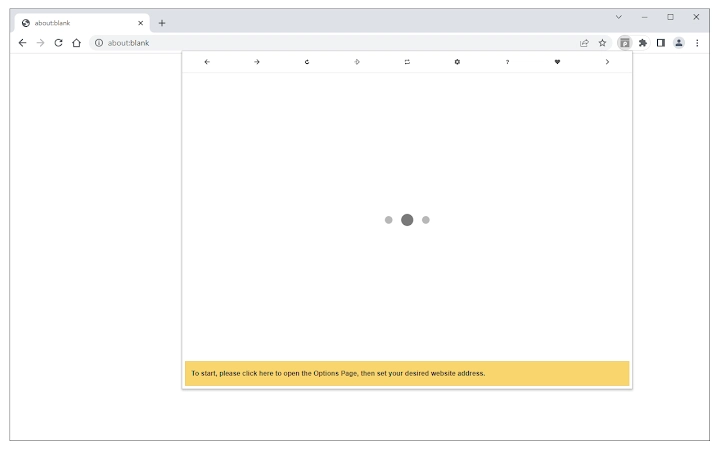

See Mobile Websites in Browser Toolbar
Overview
The Page to Popup extension offers a streamlined solution for users who need to preview websites in mobile formats directly from their browser’s toolbar. Designed for developers, designers, and content creators, it enables quick access to mobile-optimized views of any supported website without navigating away from the current tab. This functionality is particularly useful during responsive design testing, mobile usability checks, or when evaluating how content renders on various mobile platforms.
The tool supports five distinct mobile device views—iOS, Android, Windows Phone, Tizen, and Firefox OS—allowing users to simulate different mobile environments with minimal effort. This feature is beneficial for professionals working on cross-platform compatibility or those who need to verify mobile content presentation across devices. The extension is built with simplicity in mind, focusing on rapid access and minimal disruption to workflow.
Developed by MyBrowserAddon.com, the extension is distributed as a free desktop utility for Windows, Mac, and Linux. Its purpose is to enhance browser efficiency by reducing the need to switch between multiple tabs or use external emulators. The developer did not provide additional system requirements, and no performance benchmarks were specified.
Key Features & Capabilities
- Mobile View Simulation – View any website in a mobile-friendly format directly within a browser toolbar popup. This feature supports real-time previews of mobile-optimized content, ideal for responsive design validation.
- Five Device Templates – Choose from iOS, Android, Windows Phone, Tizen, and Firefox OS templates to test how a site appears on specific mobile platforms. This enables targeted usability assessments across different ecosystems.
- Customizable Panel Size – Adjust the width and height of the popup panel to match desired screen dimensions. This allows for precise control over preview size, supporting both full-screen simulation and compact view testing.
- Ad Blocking in Popup – Optionally disable ads within the popup interface to ensure clean, distraction-free previews. This improves focus on content layout and functionality during testing.
- Toolbar Integration – The extension integrates seamlessly with Chrome and Firefox browsers, launching the popup with a single click from the toolbar for fast access.
Users can leverage this tool during website audits, UI/UX evaluations, or when preparing content for mobile audiences. For example, a web designer can quickly check how a landing page appears on an iPhone screen without opening a separate emulator. Similarly, a content manager can verify mobile readability across different devices before publishing.
User Interface, Workflow & Performance
The interface of Page to Popup is minimal and designed for efficiency. It appears as a compact popup window triggered from the browser toolbar, reducing visual clutter and maintaining focus on the content being tested. Navigation is intuitive: users select a website URL and choose a mobile template, then activate the preview with a single click.
Workflow integration is smooth, as the extension operates without requiring additional setup steps. The popup appears instantly, and users can resize it dynamically using built-in controls. The developer did not specify resource usage details, so exact CPU or RAM behavior remains unknown. Performance observations are based on general software behavior patterns for lightweight browser extensions.
Stability is expected to be consistent, given the extension’s lightweight nature and single-purpose design. No known issues were reported in the provided information. However, users are advised to report any bugs through the official bug report form on the developer’s homepage.
Compatibility & System Requirements
Page to Popup is compatible with Windows, Mac, and Linux operating systems. It is designed to run as a browser extension for Chrome and Firefox, making it accessible across major desktop platforms. The installation size is 2.1 MB, indicating a lightweight footprint that should not impact system performance significantly.
Exact system requirements were not listed. The developer did not provide information on minimum processor speed, RAM, or browser version compatibility. Platform compatibility information is limited to the supported OS and browser types. Users are encouraged to verify compatibility with their current setup, especially when using older browser versions.
Pros and Cons
Pros
- Quick access to mobile website previews from the browser toolbar
- Supports five major mobile device templates for cross-platform testing
- Highly customizable popup size for precise layout evaluation
- Ad blocking feature improves preview clarity
- Free to use with no hidden costs
Cons
- No detailed system requirements provided
- Dependent on browser compatibility (Chrome/Firefox only)
- Performance behavior not specified
- Requires manual bug reporting via external form
- Limited to websites that support mobile views
FAQ Section
Is Page to Popup compatible with all browsers?
The extension is designed for Chrome and Firefox. Compatibility with other browsers has not been confirmed.
Can I use this tool offline?
Yes, once installed, the extension functions without an internet connection, though the target website must still be accessible.
Is the extension secure?
As a browser extension, it accesses website content within the user’s browser. The developer recommends reviewing permissions before installation.
How do I report a bug?
Users are directed to fill out the bug report form on the addon’s homepage at http://mybrowseraddon.com/site-to-panel.html.
Does the extension require a license?
No, Page to Popup is completely free and does not require a license key or subscription.
Final Thoughts + CTA
Page to Popup delivers a focused, efficient solution for professionals who need to preview websites in mobile formats. Its ability to simulate multiple mobile environments directly from the toolbar makes it a valuable tool for web developers, UX designers, and content managers. While some technical details are limited, the extension’s simplicity, customization options, and free availability make it a strong choice for responsive design workflows.
For users seeking a lightweight, no-frills tool to test mobile website rendering, this extension offers real utility without complexity. Its clean interface and direct functionality stand out in a crowded space of browser utilities.
Download Page to Popup now







